


How To: SpeedoDRD Install


Thread Starter
|
Member
Joined: Feb 2010
Posts: 70
Likes: 0
From: Vancouver, WA
 How To: SpeedoDRD Install
Okay so this is my first "How To" and I picked a pretty easy one, perhaps that's why there wasn't one before. 
So I got the SpeedoDRD by 12oclock Labs and installed it on my 96 F3.

First take off what ever fairings are needed to reach the speed sensor, luckily mine runs along the outside of the frame and was easy to get to.

Once you find the speed sensor connectors unplug them

Next plug in the unit

Once its plugged in, turn on the bike. I would suggest making it some what dark as the LED was kinda of hard to see with all he day light. It should blink red/green a bunch when you first turn on the bike.
Their website has a Set up calculator you can use to program the unit. Either enter your sprocket gearing, the difference in speed compared to a GPS, or the difference in distance compared to a GPS. follow the steps and you should be all set.
So I got the SpeedoDRD by 12oclock Labs and installed it on my 96 F3.
First take off what ever fairings are needed to reach the speed sensor, luckily mine runs along the outside of the frame and was easy to get to.
Once you find the speed sensor connectors unplug them
Next plug in the unit
Once its plugged in, turn on the bike. I would suggest making it some what dark as the LED was kinda of hard to see with all he day light. It should blink red/green a bunch when you first turn on the bike.
Their website has a Set up calculator you can use to program the unit. Either enter your sprocket gearing, the difference in speed compared to a GPS, or the difference in distance compared to a GPS. follow the steps and you should be all set.

Okay so this is my first "How To" and I picked a pretty easy one, perhaps that's why there wasn't one before.
So I got the SpeedoDRD by 12oclock Labs and installed it on my 96 F3.
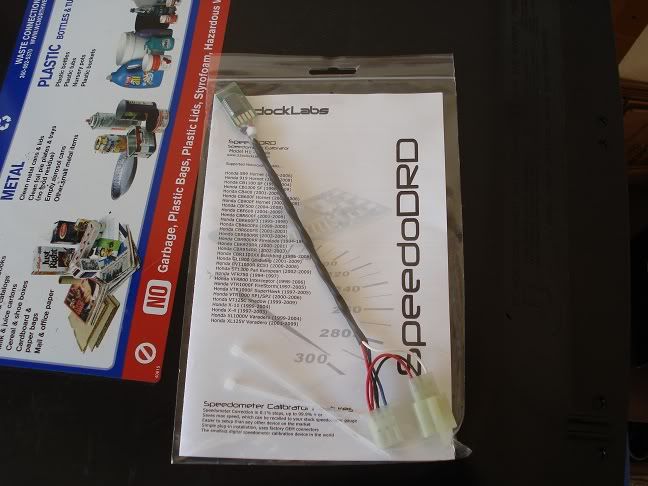
First take off what ever fairings are needed to reach the speed sensor, luckily mine runs along the outside of the frame and was easy to get to.
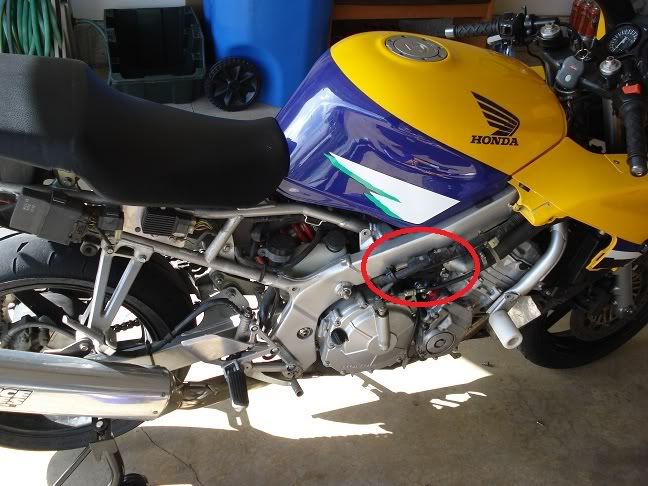
Once you find the speed sensor connectors unplug them
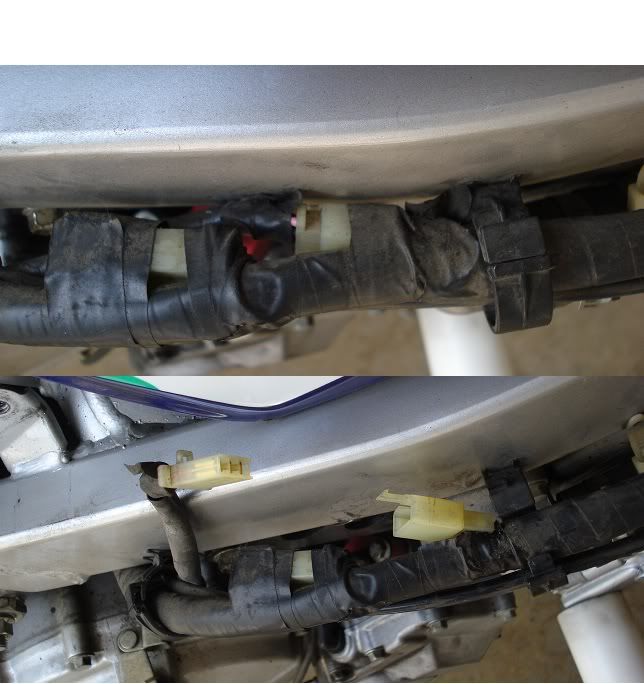
Next plug in the unit
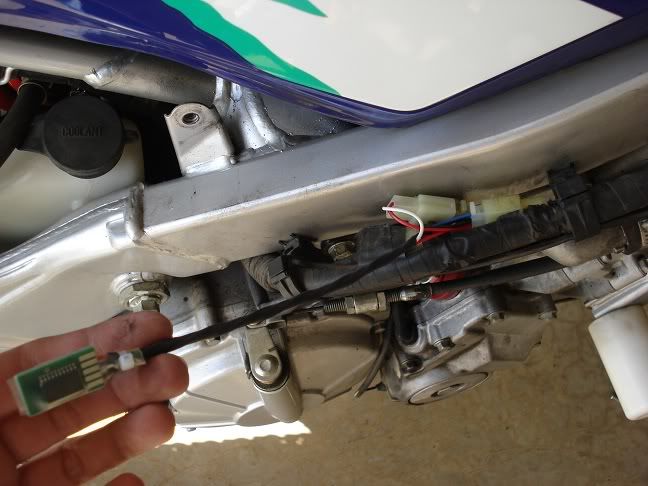
Once its plugged in, turn on the bike. I would suggest making it some what dark as the LED was kinda of hard to see with all he day light. It should blink red/green a bunch when you first turn on the bike.
Their website has a Set up calculator you can use to program the unit. Either enter your sprocket gearing, the difference in speed compared to a GPS, or the difference in distance compared to a GPS. follow the steps and you should be all set.
So I got the SpeedoDRD by 12oclock Labs and installed it on my 96 F3.
First take off what ever fairings are needed to reach the speed sensor, luckily mine runs along the outside of the frame and was easy to get to.
Once you find the speed sensor connectors unplug them
Next plug in the unit
Once its plugged in, turn on the bike. I would suggest making it some what dark as the LED was kinda of hard to see with all he day light. It should blink red/green a bunch when you first turn on the bike.
Their website has a Set up calculator you can use to program the unit. Either enter your sprocket gearing, the difference in speed compared to a GPS, or the difference in distance compared to a GPS. follow the steps and you should be all set.
are you going to mount it to your frame?

Member
Joined: Aug 2009
Posts: 30
Likes: 0
From: Tucson, AZ/Philomath, OR
The new unit was plugged into the connectors inline, so you didn't remove anything, is that correct? Does this override the stock speed sensor? Looks like an easy fix. Any pictures of how you mounted it once connected?
Thread Starter
|
Member
Joined: Feb 2010
Posts: 70
Likes: 0
From: Vancouver, WA
Here is how i mounted it


Thread
Thread Starter
Forum
Replies
Last Post
