


Adding photos to posts - walkthrough


Retired Moderator
Joined: Aug 2006
Posts: 2,406
Likes: 1
From: ATL GA State Pen
 RE: Adding photos to posts - walkthrough
ORIGINAL: pacemaker
Yeah, I had success once. Used photbucket, & tried many times doing the same thing, but nothing happened.
Anyway, I'm guilty of posting pics, my apologise, did not mean to cause problems. Any gotta go and take it out on the dog
Yeah, I had success once. Used photbucket, & tried many times doing the same thing, but nothing happened.
Anyway, I'm guilty of posting pics, my apologise, did not mean to cause problems. Any gotta go and take it out on the dog
hmmmm, that's weird because when I quote your post exactly as is, it shows the image but when you posted it, it didn't!!!!! [&:] Probably a browser conflict issue of some sort (older browser maybe?!!?)
Try this, it shouldn't make a difference but maybe it will: The [IMG] tag is used by most other boards but this one uses [IMG]. Just replace [IMG] & [/IMG] with [IMG] & [/IMG]

Senior Member
Joined: Mar 2006
Posts: 5,844
Likes: 1
From: South Texas
RE: Adding photos to posts - walkthrough
I always use FF, and I have a mountain, no 'image' button like yours. IE also has a mountain. I have found with this board [img] and [IMG] work, but [IMG] does not work.
Gonna test this out....


They all appear to be working for me, at least in preview, lets see what happens when we submit.
Gonna test this out....
Code:
Code:
Code:

Senior Member
Joined: Jul 2006
Posts: 2,473
Likes: 3
From: Newcastle, N.S.W. Australia
RE: Adding photos to posts - walkthrough
Downloaded Firefox, entered all three combos you have, all I get is where the symbol of where pic should be (as in pic icon with resize) and wot appears to be a broken link???
Retired Moderator
Joined: Aug 2006
Posts: 2,406
Likes: 1
From: ATL GA State Pen
RE: Adding photos to posts - walkthrough
As a test, can you quote rrasco's last post without changing anything and just click post to see if that narrows down the problem? then we can move on to see if it's a size issue or not.
Senior Member
Joined: Jul 2006
Posts: 2,473
Likes: 3
From: Newcastle, N.S.W. Australia
RE: Adding photos to posts - walkthrough
ORIGINAL: Kewl Breeze
As a test, can you quote rrasco's last post without changing anything and just click post to see if that narrows down the problem? then we can move on to see if it's a size issue or not.
Yeah, tried that to, but to no avail (been waiting for ages to use that). I'll keep trying
As a test, can you quote rrasco's last post without changing anything and just click post to see if that narrows down the problem? then we can move on to see if it's a size issue or not.
Yeah, tried that to, but to no avail (been waiting for ages to use that). I'll keep trying

Senior Member
Joined: Jun 2007
Posts: 2,680
Likes: 1
From: PA
RE: Adding photos to posts - walkthrough
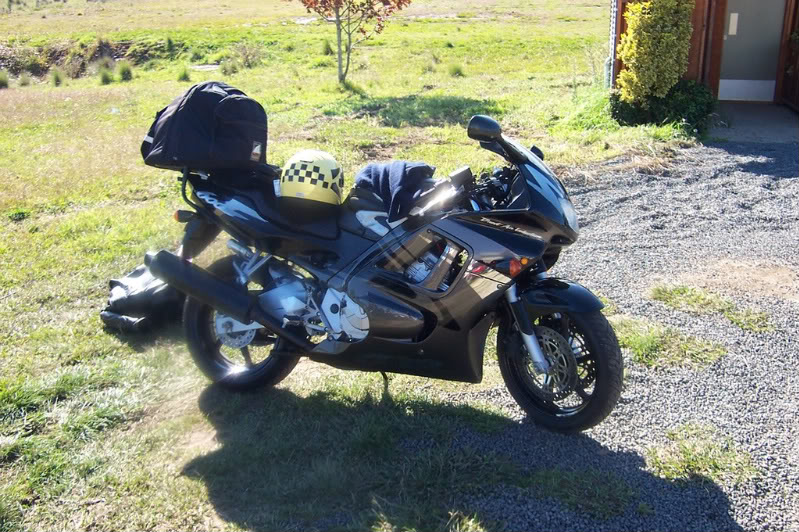
Pacemaker love the paint scheme. I have a purple, black and red F2. I really don't care for the colors...sometimes the red looks pink.
Excuse my ignorance, but is that as the decal says, a 600F?
Excuse my ignorance, but is that as the decal says, a 600F?
Senior Member
Joined: Jul 2006
Posts: 2,473
Likes: 3
From: Newcastle, N.S.W. Australia
RE: Adding photos to posts - walkthrough
ORIGINAL: woo545
Pacemaker love the paint scheme. I have a purple, black and red F2. I really don't care for the colors...sometimes the red looks pink.
Excuse my ignorance, but is that as the decal says, a 600F?
Pacemaker love the paint scheme. I have a purple, black and red F2. I really don't care for the colors...sometimes the red looks pink.
Excuse my ignorance, but is that as the decal says, a 600F?
Yes, its a flash "F".
