


Adding photos to posts - walkthrough


Senior Member
Joined: Mar 2007
Posts: 624
Likes: 1
From: Central Wisconsin
 RE: Adding photos to posts - walkthrough
I understand how that part works and I appreciate the info but how about trying to add pics from your album here at CBRforum.com? I'm gonna take someone elses pic and see if it works in the meantime.


Retired Moderator
Joined: Aug 2006
Posts: 2,406
Likes: 1
From: ATL GA State Pen
RE: Adding photos to posts - walkthrough
I'm better with visual references so here's a simple visual reference: (I'm not sure if it varies by browser type but it should all be similar):
1) While in "Reply" mode: Place cursor where you want image to appear and Click the "IMAGE" tag at top of the reply box.
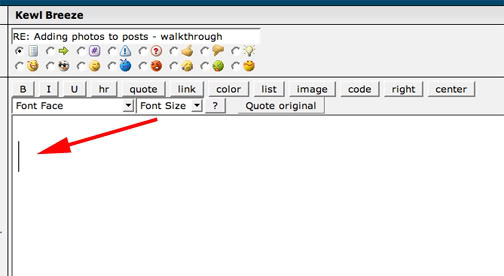
2) The result will be the image tags automatically placed for you. (You can even just type them in manually if you want)
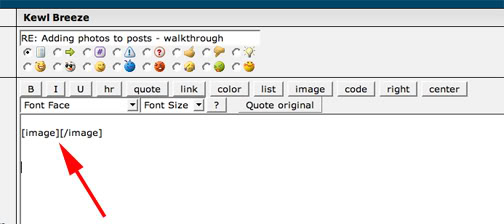
3) In between the opening image tag and closing tag paste the link to the photo you have hosted elsewhere (MAKE SURE TO LEAVE NO SPACES OR IT WILL NOT WORK)
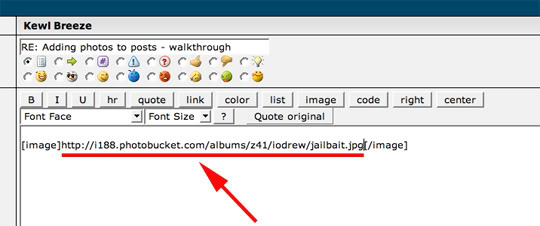
4) Click "Preview" and TADA! You should now see the pic.
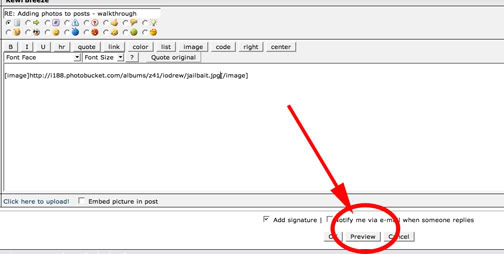
Hope this helps.
1) While in "Reply" mode: Place cursor where you want image to appear and Click the "IMAGE" tag at top of the reply box.
2) The result will be the image tags automatically placed for you. (You can even just type them in manually if you want)
3) In between the opening image tag and closing tag paste the link to the photo you have hosted elsewhere (MAKE SURE TO LEAVE NO SPACES OR IT WILL NOT WORK)
4) Click "Preview" and TADA! You should now see the pic.
Hope this helps.
Retired Moderator
Joined: Aug 2006
Posts: 2,406
Likes: 1
From: ATL GA State Pen
RE: Adding photos to posts - walkthrough
oh, sorry dude, just noticed you're trying to use the pic from this site .. so the above doesn't apply to you.
but i keep hearing others that have problems even with photos hosted elsewhere so maybe it will help one of them.
but i keep hearing others that have problems even with photos hosted elsewhere so maybe it will help one of them.
Retired Moderator
Joined: Aug 2006
Posts: 2,406
Likes: 1
From: ATL GA State Pen
RE: Adding photos to posts - walkthrough
ORIGINAL: D2DGraphix_600RR
I have a picture of a mountain, no image button ........ huh....
I have a picture of a mountain, no image button ........ huh....
Are you using Firefox? Not sure if that makes a difference but on other forums I've noticed I get different options when I use different browsers .. never tried it on this one though.

Senior Member
Joined: Jul 2006
Posts: 2,473
Likes: 3
From: Newcastle, N.S.W. Australia
RE: Adding photos to posts - walkthrough
Yeah, I had success once. Used photbucket, & tried many times doing the same thing, but nothing happened.
Anyway, I'm guilty of posting pics, my apologise, did not mean to cause problems. Anyway gotta go and take it out on the dog
Just tried it again, and its a no go. "Come here you little mongrel.............."
Anyway, I'm guilty of posting pics, my apologise, did not mean to cause problems. Anyway gotta go and take it out on the dog
Just tried it again, and its a no go. "Come here you little mongrel.............."
