


A change of season, a change of color...


 A change of season, a change of color...
Well the cacti haven't changed a bit, they won't drop their spines. But the spiny palo verde tree in my yard is dropping its pathetic "leaves" all over my driveway so it must mean winter's here.
http://phoenix.about.com/cs/desert/l/blpaloverde01.htm
With a change of season typically we all get a change of leaf color. Not in the desert. Instead I'm changing the color of my mistress.
They took a little beating making the international trek so it won't be an immediate change, but stay tuned as we make progress.
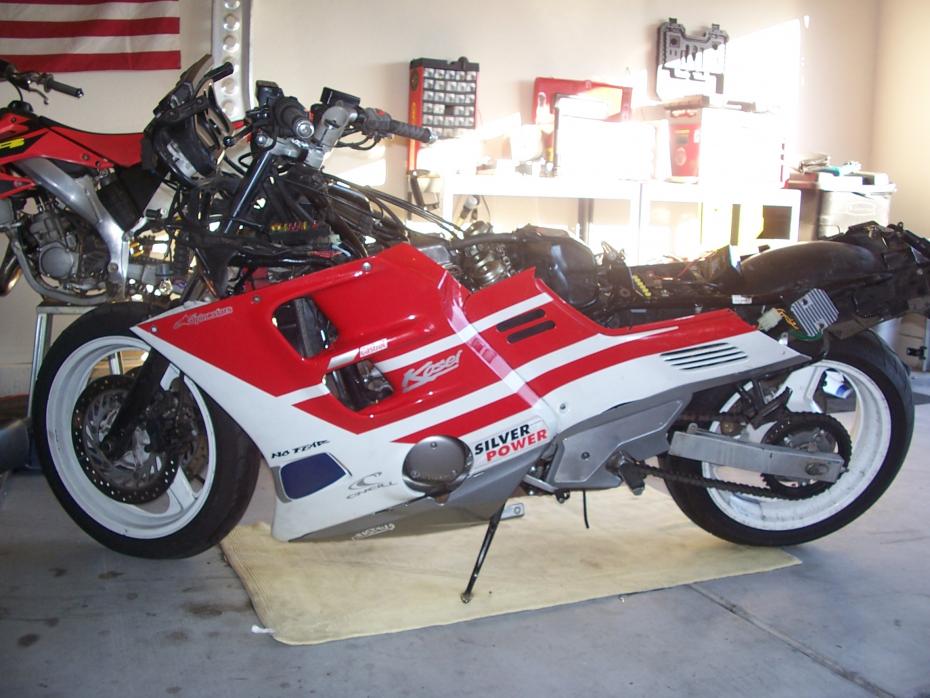
I have to do some very minor body repair work now, but I knew I already had to paint the tank, bitch bar, and front fender. So no biggie. But here's a glimpse of what is to be....
Stand by for cheap body parts for sale!!
http://phoenix.about.com/cs/desert/l/blpaloverde01.htm
With a change of season typically we all get a change of leaf color. Not in the desert. Instead I'm changing the color of my mistress.
They took a little beating making the international trek so it won't be an immediate change, but stay tuned as we make progress.
I have to do some very minor body repair work now, but I knew I already had to paint the tank, bitch bar, and front fender. So no biggie. But here's a glimpse of what is to be....
Stand by for cheap body parts for sale!!
Last edited by CBRclassic; Dec 13, 2009 at 06:02 PM.


September 2009 ROTM Winner - Faster than a Speeding ..........
Joined: Nov 2008
Posts: 3,808
Likes: 3
From: UK
Looks like a real treasure trove of parts there Mike!
I thought she looked gorgeous before , but you can't always tell from pics . Hope she turns out the way you want
BTW great view of your new voltage reg/rec
I thought she looked gorgeous before , but you can't always tell from pics . Hope she turns out the way you want
BTW great view of your new voltage reg/rec
Which is not that big of a deal, fresh paint makes all new
BUT... the body was starting to really to take a bad turn. Almost all tabs were previously bust off & missing or barely hanging on and continuing to get worse. There were TONS of hairline stress fractures I started looking at doing full body repairs and paint. The amount of time and money it was just more cost effective to start fresh.
 . Like that reg/rec huh ME TOO!!!!
Guest
Posts: n/a
Looking dam good Mike ...
I love the red white and blue ...
and not because its the color of our flags either ... LOL
Gawd ...mine needs a good polish ...yours is bloody shinny
BTW - Mike , om just curious, ... may I ask why you don't run your banner in your sigi , and run it as an image in each post instead mate ...
I love the red white and blue ...
and not because its the color of our flags either ... LOL
Gawd ...mine needs a good polish
...yours is bloody shinny BTW - Mike , om just curious, ... may I ask why you don't run your banner in your sigi , and run it as an image in each post instead mate ...
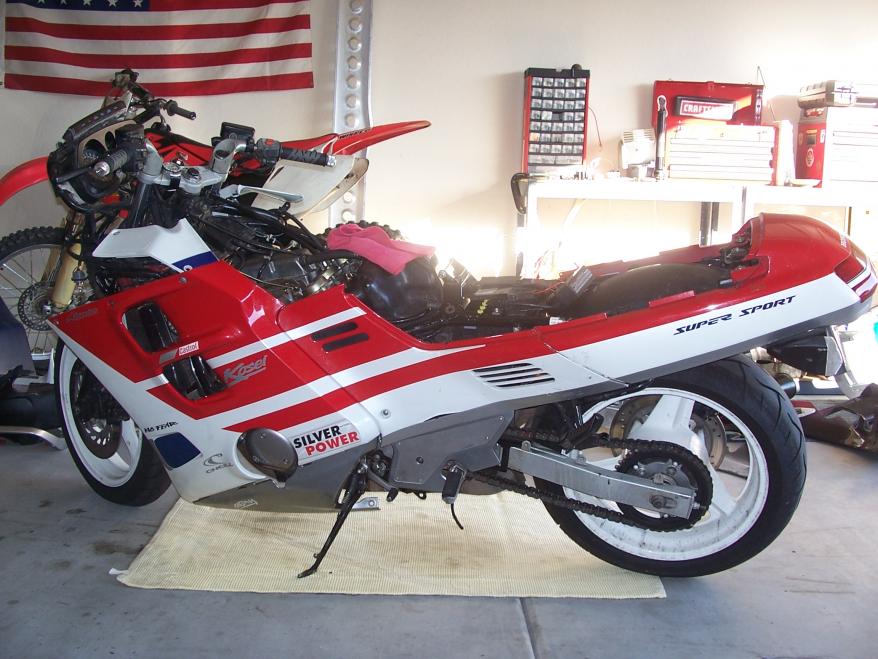
Got the tail tab fixed & on her now (one of the repairs I had to do).... Brake and tail lights look good!
Last edited by CBRclassic; Dec 13, 2009 at 06:05 PM.


Administrator, MVN / ROTM NOV 2012
Joined: Aug 2008
Posts: 11,003
Likes: 3
From: Republic of Boon Island
Very Good Mike .........the fly finally came through ........good deal......for you
A warm climate will be good for them !
I have seen those exact fairings mounted before .........wonder what he did to/with
the actual bike.
A warm climate will be good for them !
I have seen those exact fairings mounted before .........wonder what he did to/with
the actual bike.

It looks to be coming together nicely, Mike!!
(BTW, I like your dirtbike too.... always Ride Red....)
As far as putting your banner in your sig.....
1) Click on "User CP" in the options up top on the far left.
2) Under "settings and options" on the left menu, choose "edit signature"
3) Under the "signature picture" area, you can add the destination of where your banner pic currently resides (either a URL or on your computer)
4) Then just hit "upload" after you copy and paste in the destination address in the appropriate box.
Then you can load it up/preview it/play around with it, etc. and see if it came out right
(BTW, I like your dirtbike too.... always Ride Red....
)As far as putting your banner in your sig.....
1) Click on "User CP" in the options up top on the far left.
2) Under "settings and options" on the left menu, choose "edit signature"
3) Under the "signature picture" area, you can add the destination of where your banner pic currently resides (either a URL or on your computer)
4) Then just hit "upload" after you copy and paste in the destination address in the appropriate box.
Then you can load it up/preview it/play around with it, etc. and see if it came out right

