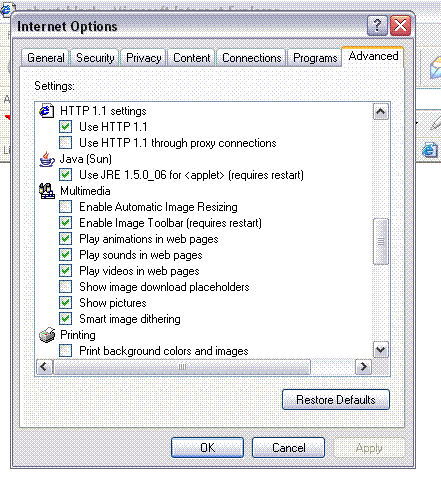
Computer Problems, Java, Settings?!? Help Please


Thread Starter
|
Senior Member
Joined: Jul 2006
Posts: 5,248
Likes: 0
From: Scottsburg,In/DaytonaBch,Fl
 Computer Problems, Java, Settings?!? Help Please
Just wondering why on my laptop that the Icons from this page and other sites and smileys are no long animated on it. Everything is still ... TXmorgans signature used to be animated and so did the smileys on this page. But they arent anymore. Can anyone tell me if I can check some settings or install something on here to make them animated again. I know someone has to know, hopefully . Thanks, Nick
Also, when I put the mouse over the animated smileys that dont move, it says javavoid in the bottom on the window in the status corner part. (where is usually says done)
. Thanks, Nick Also, when I put the mouse over the animated smileys that dont move, it says javavoid in the bottom on the window in the status corner part. (where is usually says done)
Thread Starter
|
Senior Member
Joined: Jul 2006
Posts: 5,248
Likes: 0
From: Scottsburg,In/DaytonaBch,Fl
RE: Computer Problems, Java, Settings?!? Help Please
Also, the puter is running a little slower tha usual. WTF happened?!?!?!? If you do know anything I can check, I might need a little step by step if you dont mind.

Senior Member
Joined: Aug 2006
Posts: 1,260
Likes: 0
From: El cajon
RE: Computer Problems, Java, Settings?!? Help Please
there not java, they are .gif, there just pics. save one of the animated smiles to desktop and open them with the fax viewer thing and see if they are animated. gif`s always work no matter what. some are flash and if its that than just update plugin.
Thread Starter
|
Senior Member
Joined: Jul 2006
Posts: 5,248
Likes: 0
From: Scottsburg,In/DaytonaBch,Fl
RE: Computer Problems, Java, Settings?!? Help Please
These are bitmaps if that matters and I saved it and there is no animation. But there are animated on my desktops. Anyone else have an idea?
Senior Member
Joined: Aug 2006
Posts: 1,260
Likes: 0
From: El cajon
RE: Computer Problems, Java, Settings?!? Help Please
if they are bitmaps then they will not be animated. none of thies are animated???
[sm=angrymail.gif][sm=badbadbad.gif][sm=americanasmiley.gif][sm=bounceybounce.gif]
[sm=angrymail.gif][sm=badbadbad.gif][sm=americanasmiley.gif][sm=bounceybounce.gif]
Thread Starter
|
Senior Member
Joined: Jul 2006
Posts: 5,248
Likes: 0
From: Scottsburg,In/DaytonaBch,Fl
RE: Computer Problems, Java, Settings?!? Help Please
They are on my desktop though, thats the wierd thing. The flames move, the flag waves, etc. Thats why I am confoosed, lol. Whats going on?!?!?